Help Centre › Automation
Welcome message & instant answers
Reply to every customer in a second — even at 2 am.
Hi
Hi Rahul! 👋 Welcome to Glow Salon. How can we help?
What are the prices?
Haircut ₹500 · Facial ₹1,200 · Bridal from ₹15,000 💇♀️
| Reply type | When it is sent |
|---|---|
| Welcome message | The very first time someone messages you |
| Instant answers | When the message contains a word you choose — “fees”, “address”, “timings”… |
| After-hours reply | Outside your office hours (Settings), at most once every 6 hours |
| Ad leads | When someone messages you from an ad |
| Fallback reply | When nothing else matched and your team hasn’t replied (once every 12 hours) |
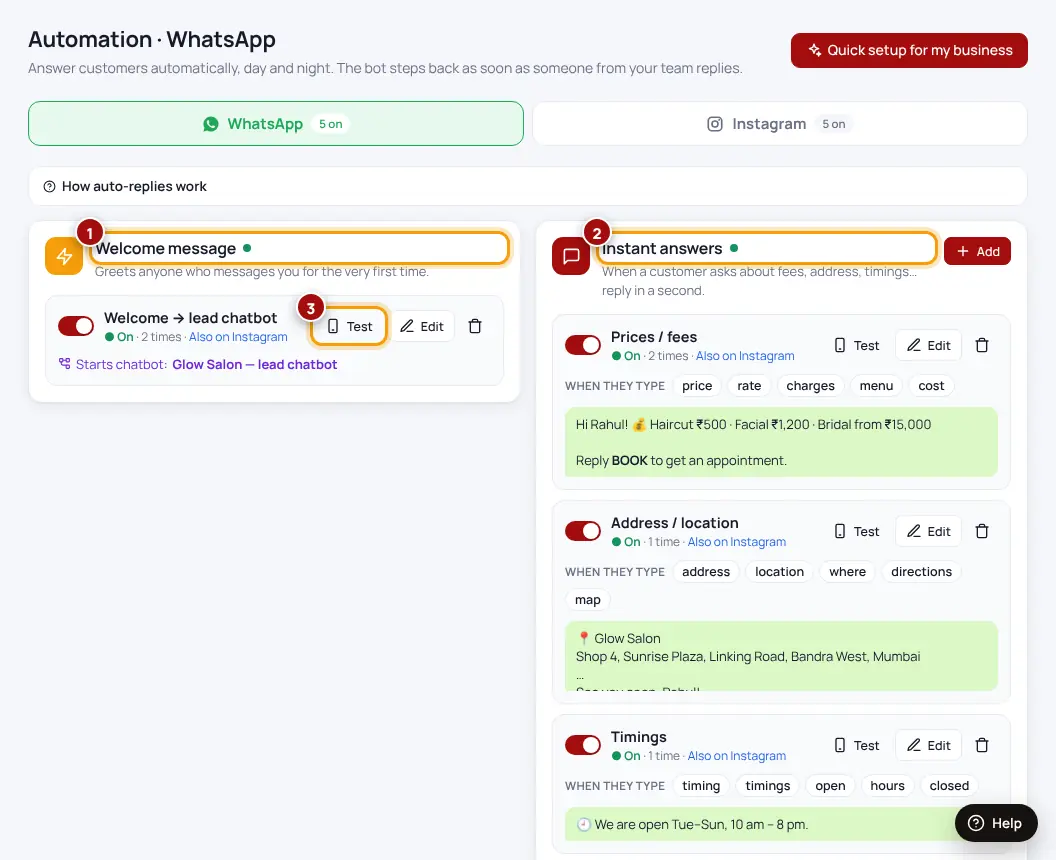
- Open AutomationChoose WhatsApp or Instagram in the menu.
- Add a replyPick the type, write the words to look for (for instant answers) and your message. Use “+ First name” to add the customer’s name.
- Switch it onThen press “Test on my phone” to see it arrive.
The bot stops by itself as soon as someone from your team replies in the chat.
Was this helpful?Thanks! Need more help? Ask the help assistant
Next: Comment → DM on Instagram →