Help Centre › Connect your accounts
Connect Instagram
Connect your Instagram professional account in about 2 minutes.
Before you start (on your phone)
- Use a Business or Creator accountInstagram → Settings → Account type and tools → Switch to professional account. It’s free and you keep all your followers and posts.
- Allow access to messagesInstagram → Settings → Messages and story replies → Message controls → Connected tools → turn on “Allow access to messages”.
Connect in Spidery Connect
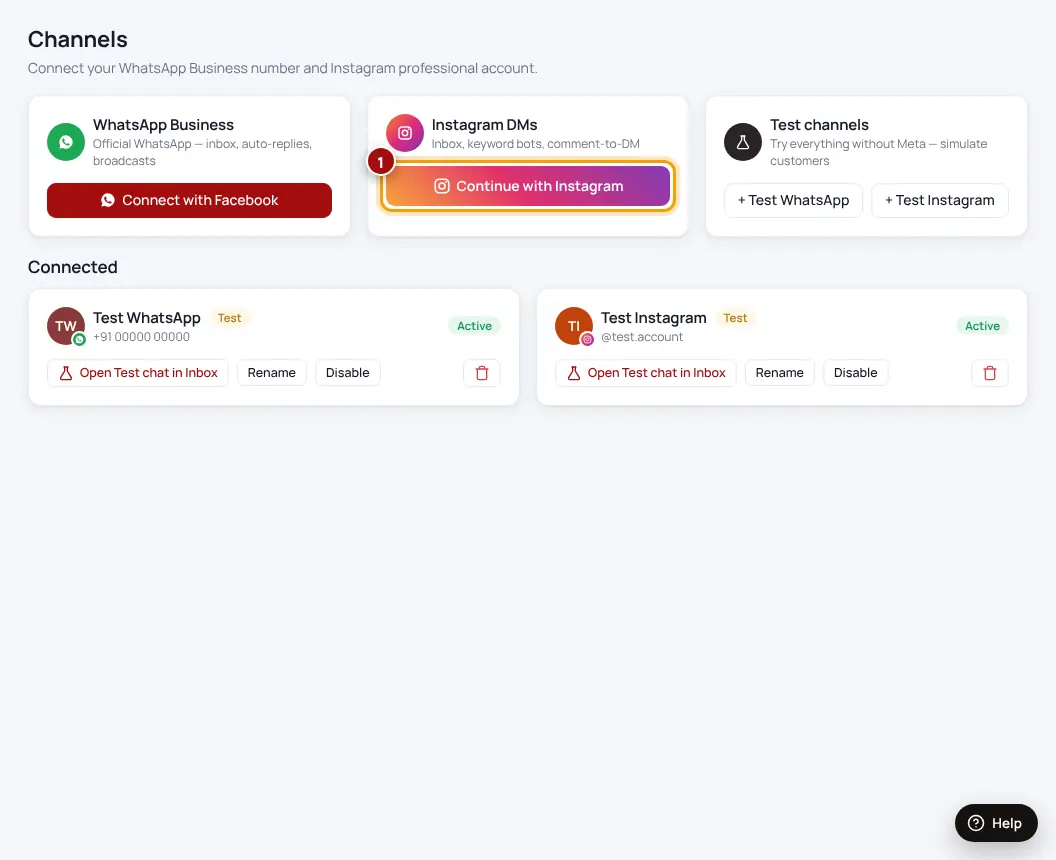
- Open ChannelsIn the menu, click Channels.
- Click “Continue with Instagram”On the Instagram card.
- Log in and click AllowUse the Instagram account you want to connect. We only use the permissions to read and reply to your DMs and comments.
- DoneYour account shows under “Connected” as Active. Send a DM from another account to test it.
Getting an error? The account is probably still Personal — switch it to Business or Creator and try again.
| Problem | Fix |
|---|---|
| Connected, but DMs don’t arrive | Turn on “Allow access to messages” (step 2 above) |
| The wrong account got connected | Log out of Instagram in your browser, then click Continue with Instagram again |
| Shows “needs reconnecting” | Your password changed or access was removed — click Continue with Instagram again |
Was this helpful?Thanks! Need more help? Ask the help assistant