Help Centre › Getting started
Get started in 10 minutes
The quickest way from a new account to automatic replies on WhatsApp and Instagram.
Sign up7-day free trial
Quick setuppick your business type
ConnectInstagram & WhatsApp
Switch onreplies & comment → DM
Livereplies 24×7
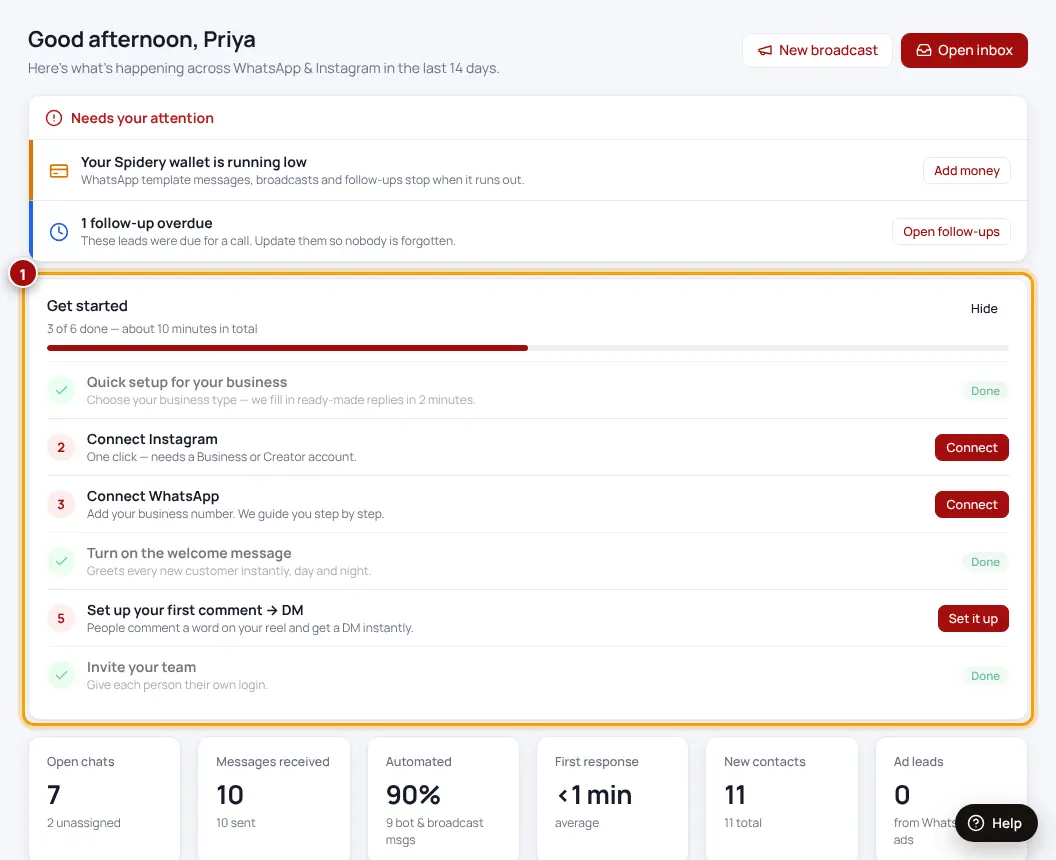
Your Dashboard has a Get started card with every step and a button to do it. Go from top to bottom:
- Quick setupChoose your business type (salon, clinic, coaching, real estate…) and fill in what you offer, prices, address and timings. We write your replies for you.
- Connect InstagramOne click with “Continue with Instagram”. Your account must be a Business or Creator account.
- Connect WhatsAppClick “Connect with Facebook” on the Channels page and follow the Meta window.
- Turn on the welcome messageEvery new customer gets an instant hello, day or night.
- Set up your first comment → DMPeople comment a word like INFO on your reel and get your details in their DMs.
- Invite your teamEach person gets their own login.
Use Test on my phone on any reply to see exactly what your customers receive.
Was this helpful?Thanks! Need more help? Ask the help assistant
Next: Your Dashboard explained →